Create a GDPR impact type in ARIS Risk and Compliance
You can assess a risk in ARIS Risk and Compliance based on various impact types. The GDPR impact type is used for risks related to processing activities. The data protection officer uses the GDPR impact type to decide whether or not a processing activity involves a high risk for a data subject.
Prerequisites
You have the System administrator role.
Start ARIS Risk and Compliance.
Click
 Administration. The General menu item is displayed initially.
Under System management, click Basic settings.
Click Risk Management. The form is displayed.
Click
 New in the Impact types row. The Create impact type dialog opens.
Select No template (create new impact type).
Click OK. The Impact type form opens.
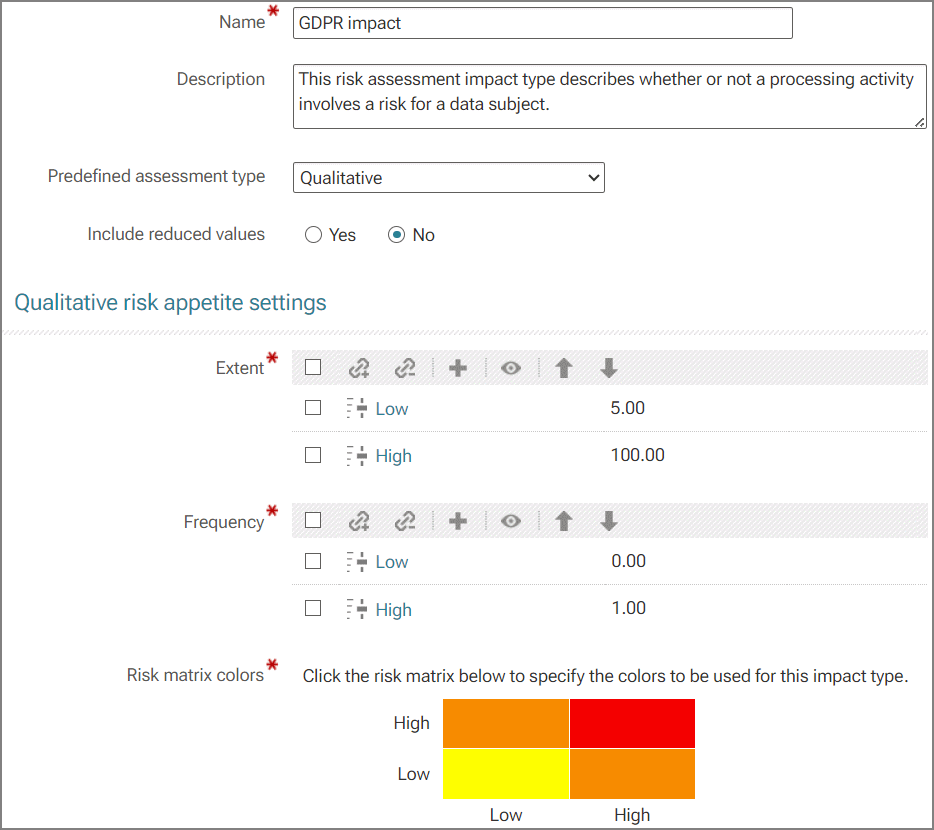
Enter a name for the impact type, for example, GDPR impact.
Assign extent and frequency values for the qualitative assessment (
 ) or create new ones ().
If you want risk scores to be calculated, add weightings to the values.
Click a cell in the matrix to specify the color in which the impact type is to be displayed in the risk matrix (qualitative).
Click OK.
Edit the optional fields. Enter a description, for example.
Click
 Save.
Save.
The GDPR impact type is created.